TL;DR
- Technical specs are identical: Both Personal and WhatsApp Business accounts use a 1:1 square canvas, an official minimum of 192×192 px, and a practical sweet spot of 640×640 to 1080×1080 px.
- Design rules are different: Personal faces are organic and forgive corner cropping; corporate logos and wordmarks get cut off or become illegible.
- Follow the 80% Safe Zone rule: Keep all logotypes, text, and primary marks inside the center 60%–80% circle.
- Businesses must use PNG: Avoid JPEG ringing artifacts around sharp typographic edges by exporting lossless PNG from DP Sizer's Logo Mode.
When setting up a WhatsApp Business account, a common question arises: Does a Business profile require a different image size, resolution, or aspect ratio than a personal account?
The short answer is no. Under the hood, WhatsApp uses the exact same image processing engine for both Personal and Business profiles. However, while the technical specifications are identical, the design rules are entirely different. Personal users upload faces; businesses upload logos and wordmarks. And in WhatsApp’s ruthless circular crop, logos are significantly harder to format than human heads.
This guide breaks down the geometry of the WhatsApp Business profile picture, why brand assets get destroyed by the circular crop, and how to use DP Sizer to protect your company’s visual identity.
The Technical Reality: One Engine, Two Users
There is no secret “Business-tier” resolution on WhatsApp. Both account tiers share the exact same core parameters:
- Aspect Ratio: 1:1 (Square).
- Display Shape: Inscribed circular crop across chat lists, contact sheets, and headers.
- Official Minimum: 192×192 pixels (as detailed in our History of WhatsApp DP Sizes).
- Effective Working Resolution: 640×640 to 1080×1080 pixels.
- Max Upload Size: Up to 5MB.
Whether you are an individual uploading a selfie or a multinational brand uploading a registered trademark, WhatsApp takes your square file, downscales it, applies server compression, and masks it inside a circle. The difference lies entirely in what you are uploading.
The Design Divide: Organic Faces vs. Geometric Logos
Why Faces Survive the Crop
Human faces are organic and centrally weighted. If the circular crop cuts off the edge of a jacket shoulder or the fringe of a hairstyle, the viewer’s brain naturally fills in the missing contours. Personal users can get away with filling the square frame edge-to-edge.
Why Logos Fail the Crop
Brand assets are geometric, rigid, and text-heavy. If the circular crop trims the corner of a square, it slices off the first letter of a company name, the tail of a serif font, or the border of an emblem. A logo with chopped-off typography doesn’t just look cropped — it looks broken and amateurish on customer phones.
The Logo Safe Zone: The 80% Rule
Because WhatsApp displays profile pictures as a circle inscribed inside a square, the four corners of your 640×640 canvas represent dead space.
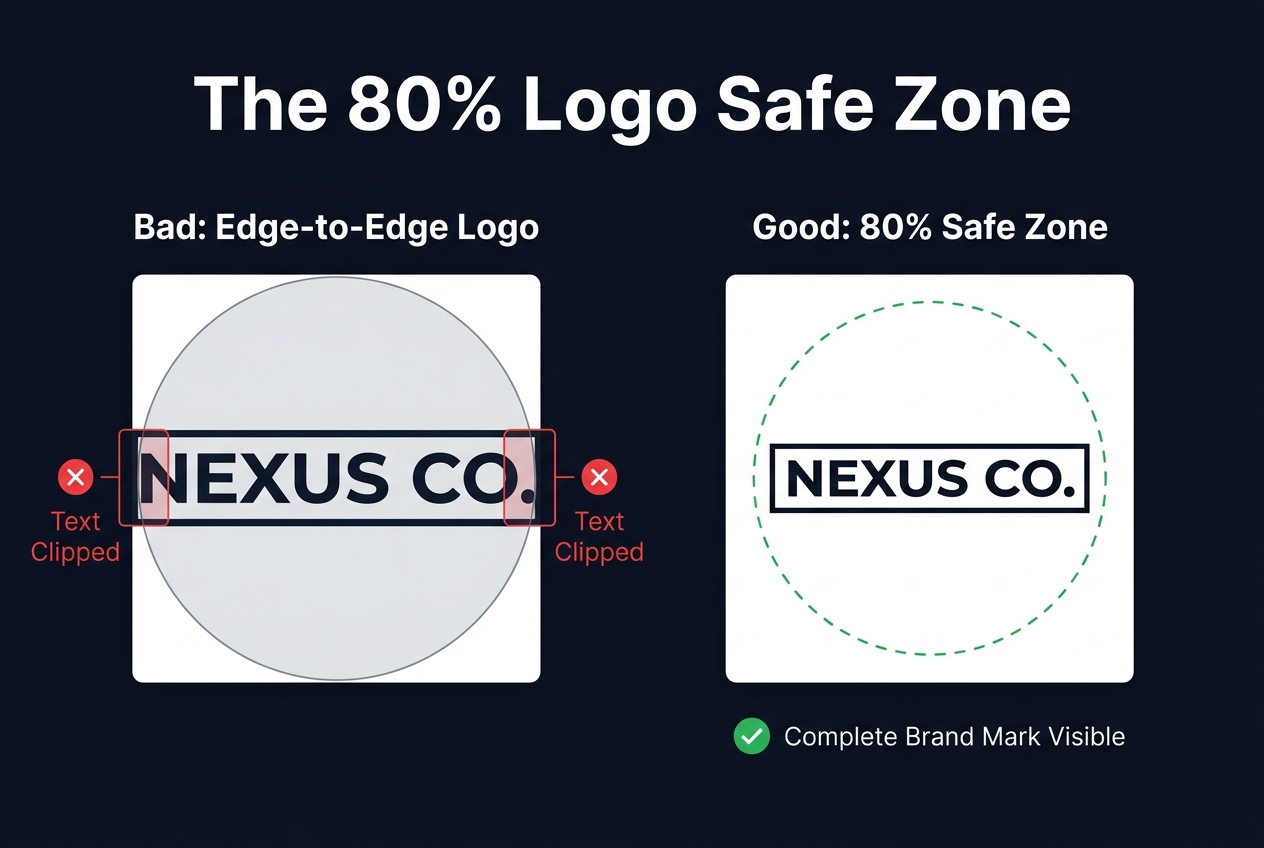
Visual comparison: Edge-to-edge logo placement gets clipped by the circle mask. Centering within the 80% safe zone guarantees complete visibility.
If you are designing a WhatsApp Business DP in Canva, Figma, or Illustrator, adhere to the Circular Safe Zone:
- The Inner Circle (Safe Zone): Keep 100% of your logotype, taglines, and critical visual elements inside the center 60% to 80% diameter of the canvas.
- The Outer Corners (Danger Zone): The outer 20% will inevitably be masked out. Never place essential brand marks or text in this perimeter.
How DP Sizer helps: Toggle on the Circular Preview and safe-area guides in our editor. You can drag and rescale your logo to verify zero text bleeds outside the inner boundary before exporting.
The 3 Best Formats for WhatsApp Business Logos
Commercial brand assets typically fall into three categories. Here is how to handle each inside DP Sizer:
1. The Standalone Brand Icon (e.g., Apple, Target, Nike)
If your brand possesses a recognizable standalone glyph or symbol:
- The Fix: Upload the icon, select Crop to Fit, and ensure it is dead-center with 15–20% breathing padding.
- Pro Tip: Use the Background tool to apply your exact corporate Hex color as a solid fill so the mark pops cleanly in both Light and Dark mode.
2. The Horizontal Wordmark (e.g., Sony, FedEx, Professional Practices)
Horizontal rectangular wordmarks are the most frequent victims of WhatsApp’s circular crop. Stretching a wide banner across a square either chops off the first and last letters or shrinks the text until it is illegible.
- The Fix: Select Full Photo mode. DP Sizer places your full horizontal wordmark inside the center of the square and automatically generates a subtle blurred or color-matched background for the upper and lower dead space. Your complete company name survives intact inside the circle.
3. The Emblem, Seal, or Circular Badge
Law firms, educational institutions, and craft brands frequently utilize circular crests with dense fine-line detail.
- The Fix: Export at 1080×1080 px to give WhatsApp a high-density source to downscale from. Export as lossless PNG to preserve thin line weights.
The Format Imperative: Why Businesses MUST Use PNG
While personal selfies benefit from JPG or WebP compression to save bandwidth, businesses should always export logos as PNG.
The reason comes down to an encoding artifact called ringing (or mosquito noise). JPEG compression algorithms rely on discrete cosine transforms (DCT) that struggle along sharp, high-contrast edges — exactly the characteristics of typography and vector geometry. When WhatsApp re-encodes a JPEG logo, fuzzy halos appear around the text (see our detailed compression breakdown).
PNG is completely lossless. Exporting your business DP from DP Sizer as a PNG locks in crisp vector outlines, clean solid colors, and alpha transparency that survive server recompression without muddy halos.
WhatsApp Business Cover Photo Specifications
Unlike personal accounts, WhatsApp Business allows you to add a header banner behind your profile picture across your catalog and business details sheet:
- Dimensions: 1125 × 600 pixels (horizontal rectangle).
- Aspect Ratio: ~1.875:1.
- Design Tip: Keep vital promotional text centered, as the profile picture circle overlaps the bottom-left corner of the banner on mobile screens.
Format Your Brand Logo
Center your wordmark within the 80% safe zone and export a crisp PNG in seconds.
Frequently Asked Questions
No. Both account tiers share the identical 1:1 square canvas and circular mask. The recommended export resolution is 640×640 or 1080×1080 pixels for both.
Yes. If you upload a transparent PNG, WhatsApp displays the background using the user’s current UI theme (white in light mode, dark grey in dark mode). Adding a branded solid background fill in DP Sizer guarantees consistent contrast regardless of user settings.
Use DP Sizer’s Full Photo mode. It centers your wide wordmark within the square canvas and fills the top and bottom margins with a blurred or solid brand color, keeping all letters safely inside the 80% circular safe zone.
The WhatsApp Business Cover Photo header is recommended at 1125 × 600 pixels (landscape orientation). Keep primary information centered to avoid overlap with the circular profile picture icon.
JPEG compression introduces ringing artifacts (fuzzy pixel halos) around high-contrast vector lines and sharp typography. Exporting as PNG preserves lossless edges and crisp typography that survive server recompression.
Sources & Reference
- WhatsApp Business Help Center: Account setup, profile management, and catalog cover images.
- Design specifications reflect standard 1:1 inscribed circular geometry and WCAG accessibility guidelines for mobile typography.
- DP Sizer is an independent browser utility and is not affiliated with WhatsApp or Meta Platforms, Inc.